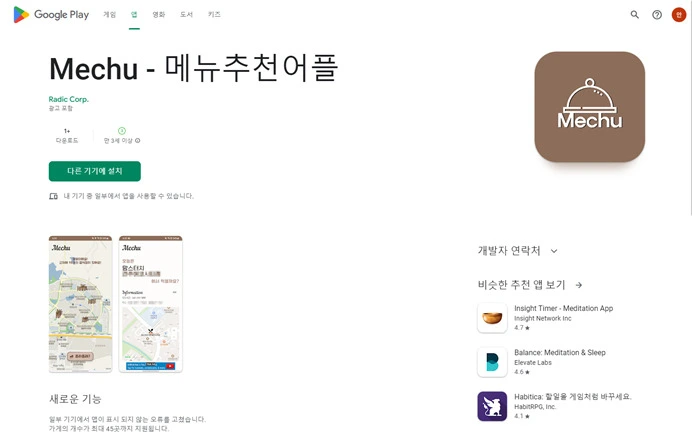
Mechu is an Android app I built to solve an everyday problem: "What should I eat today?" It is a simple but handy tool that searches for restaurants around your location and picks one at random.
Project overview
The project started from the familiar lunchtime loop with friends: "What do you want to eat?" → "Anything." The idea was to build an app that gets around the paradox of choice.
The core features are as simple as possible:
- Search for nearby restaurants based on my location
- Pick one at random with a single button
- Show the chosen restaurant's details and its location on a map
Rather than piling on features, I focused on one instant experience: the "draw."
Tech stack
- Languages: Java + Kotlin (mixed)
- IDE: Android Studio
- APIs:
- Kakao Map API (map display, location data)
- Naver Local Search API (restaurant search)
I started the app in Java, then brought in Kotlin in the later stages and wrote new features in Kotlin. Moving from Java's verbosity to Kotlin's conciseness was a good learning experience.
Key implementation details
Handling location permissions
Android 6.0 (API 23) and later require runtime permission requests. The app requests location access and, if the user denies it, falls back to an alternative UI (manual address entry).
Location-based restaurant search
The app gets the current location with FusedLocationProviderClient and passes those coordinates to the Naver Local Search API to fetch a list of restaurants within a radius. The results are parsed from JSON into an internal data model.
GET https://openapi.naver.com/v1/search/local.json
  ?query=음식점
  &display=20
  &start=1
  &sort=random
Kakao Map integration
The chosen restaurant is shown as a marker on Kakao Map, and tapping it opens a deep link into the Kakao Map app or website, so the user can move straight on to directions.
Random pick animation
To make it more fun than just picking one item, I implemented a slot-machine-style rolling animation. Combining ViewFlipper with Handler.postDelayed produces a rolling effect that gradually slows down.
Food category filter
I added category filters such as Korean, Chinese, Japanese, Western, and cafés so you can narrow the candidates to the kind of food you want.
Release
The app was officially released on the Google Play Store. The release process itself, from developer registration and app signing to policy compliance and preparing screenshots and descriptions, was a big learning experience.
You can download the app from the Google Play Store.
The code is available on GitHub.
Takeaways
- Focus on a small feature: Resisting the urge to add lots of features and focusing on the single "draw" turned out well. It drove home the importance of an MVP.
- The risk of API dependence: Policy or pricing changes to the Naver and Kakao APIs directly affect running the app. In the long run, building my own data should be considered too.
- Android version fragmentation: Set the minimum supported version low and you can't use new APIs; set it high and you lose users. Finding the balance is hard.
- The release process: Releasing can be more complex than developing. Policy compliance (privacy, ads, content rating) takes a lot of time.
- Moving from Java to Kotlin: Rewriting the same feature in Kotlin cut the code by 30–50%. I also came to appreciate the value of null safety.
It isn't a large app, but it was a meaningful project that let me go through the whole cycle, from the initial idea to development, release, and maintenance.