Chapter 4: Virtual Memory Overview
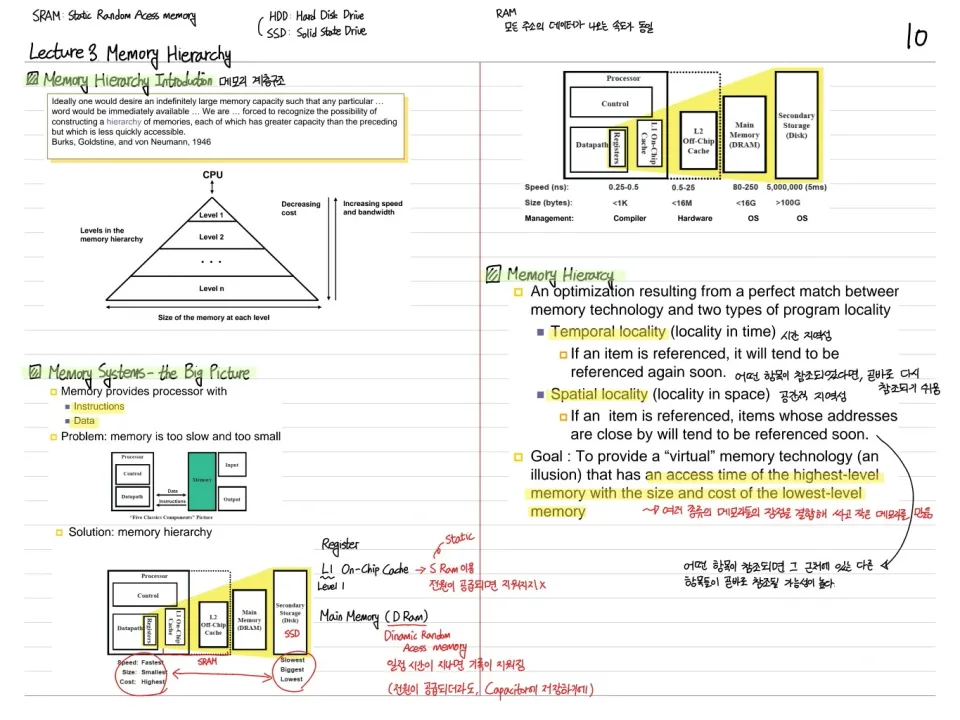
Virtual memory is a memory hierarchy technique that lets programs use more physical memory than is actually available. By giving each process its own virtual address space, it achieves isolation between processes and protection/sharing at the same time.
How It Is Implemented
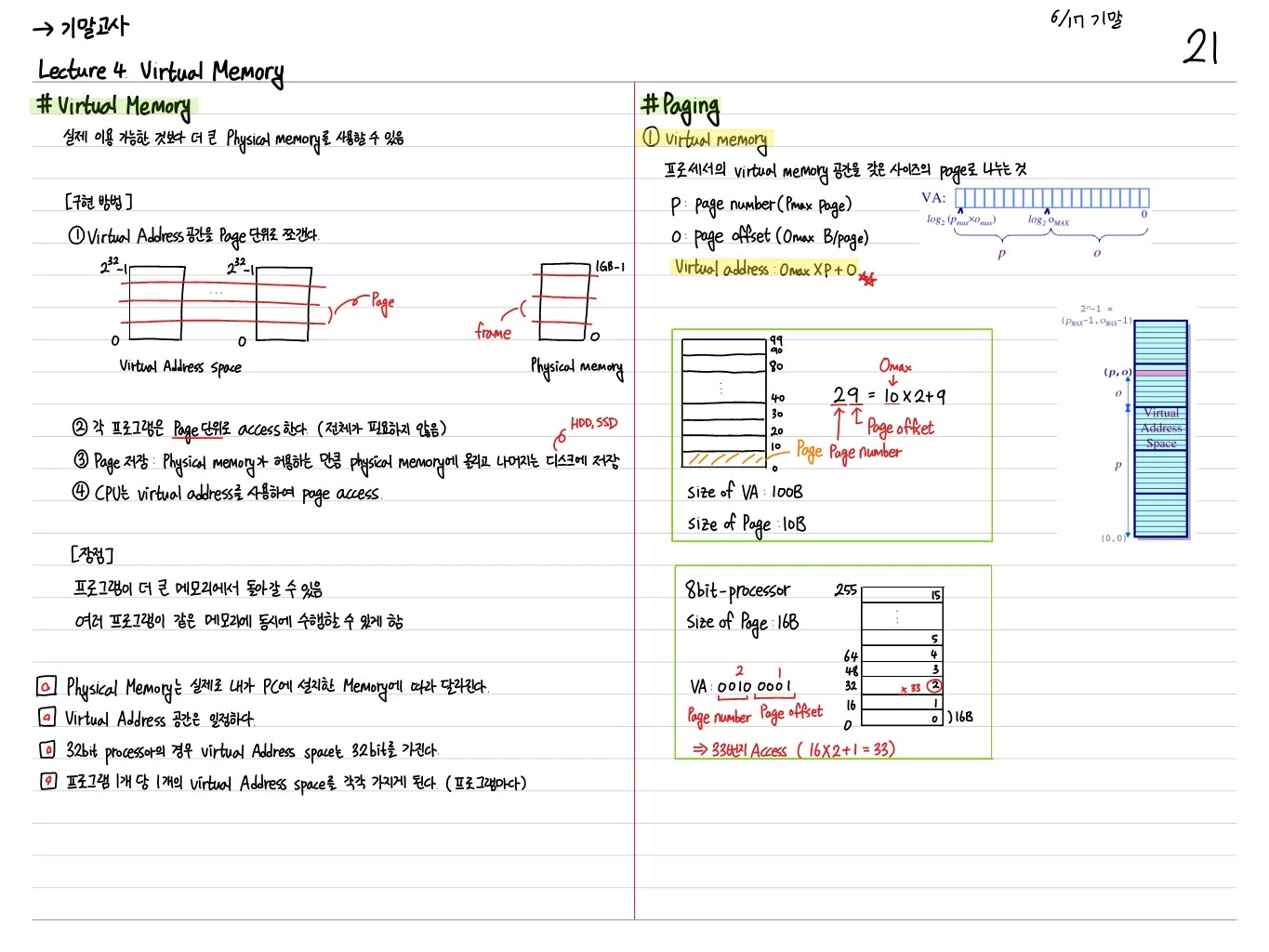
- ① Split the virtual address space into pages. Example: on a 32-bit processor, the virtual address space of -1 is divided into pages.
- ② Each program accesses memory page by page (it does not need all of it)
- ③ Storing pages: load as many pages into physical memory as it allows, and keep the rest on disk (HDD, SSD)
- ④ The CPU accesses pages using virtual addresses
Advantages
- A program can run in more memory than the physical memory actually installed
- Multiple programs can run in the same memory at the same time
- The virtual address space is fixed (by the processor architecture), while physical memory depends on how much memory is actually installed in the PC
- Each program gets its own virtual address space
Paging
① Virtual Memory
Dividing the processor's virtual memory space into pages of equal size.
- : page number ( page)
- : page offset ( B/page)
- Virtual address:
Example: Size of VA = 100B, Size of Page = 10B. Address 29 = → page number = 2, page offset = 9.
Example: 8-bit processor, Size of Page = 16B. VA = 0010 0001 → page number = 2, page offset = 1 → access address .
② Physical Memory
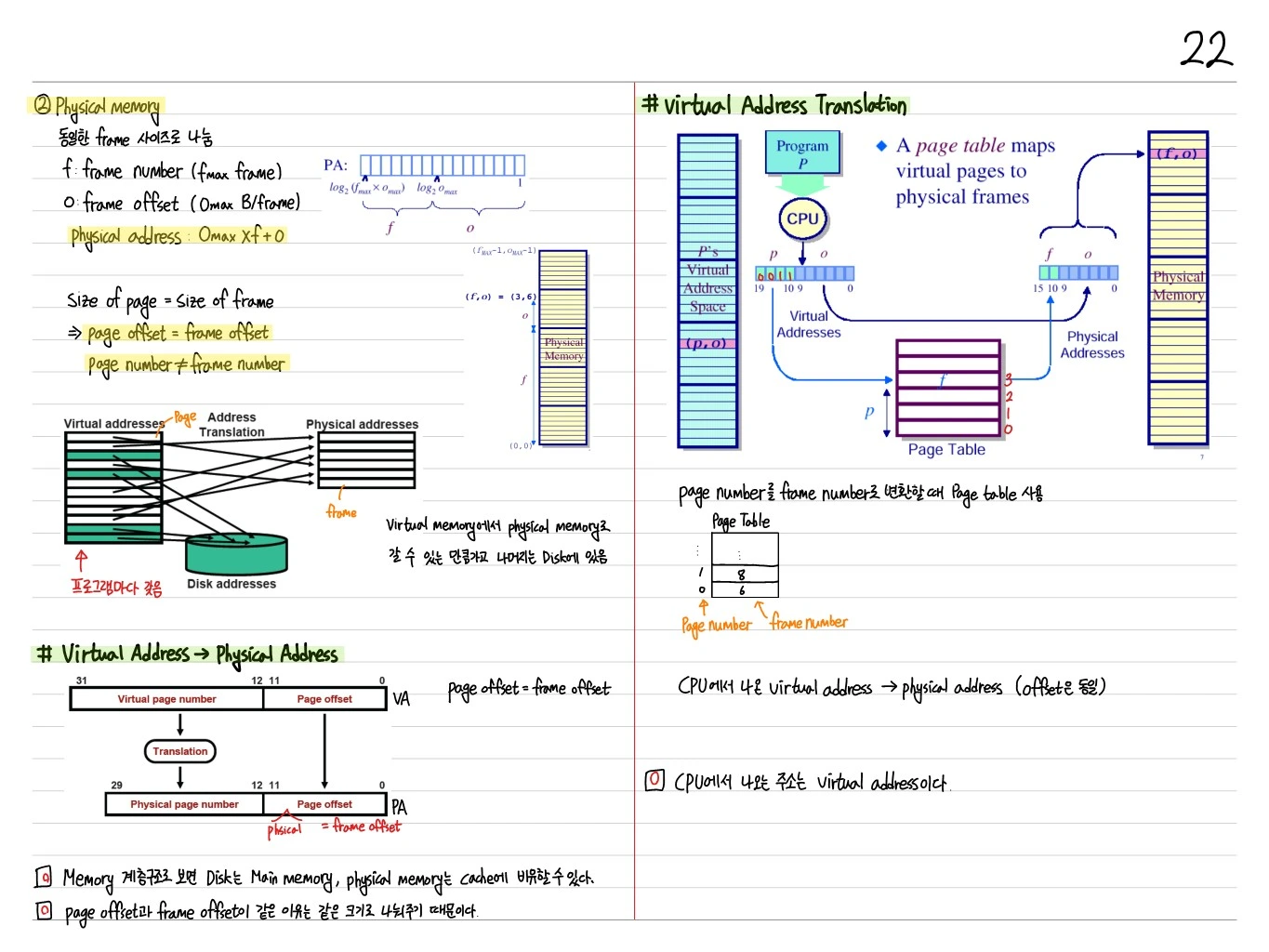
Divided into frames of the same size.
- : frame number ( frame)
- : frame offset ( B/frame)
- Physical address:
Size of page = Size of frame → page offset = frame offset, page number ≠ frame number
As much of virtual memory as fits goes into physical memory, and the rest stays on disk.
Virtual Address → Physical Address Translation
| VA (31-0) |
|---|
| Virtual page number (bits 31-12) + Page offset (bits 11-0) |
→ Translation →
| PA |
|---|
| Physical page number (29-12) + Page offset (11-0) |
page offset = frame offset (because both are divided into the same size)
Virtual Address Translation
A page table maps virtual pages to physical frames.
The CPU generates a virtual address () → the page table translates → memory is accessed with the physical address ().
Page Table Organization
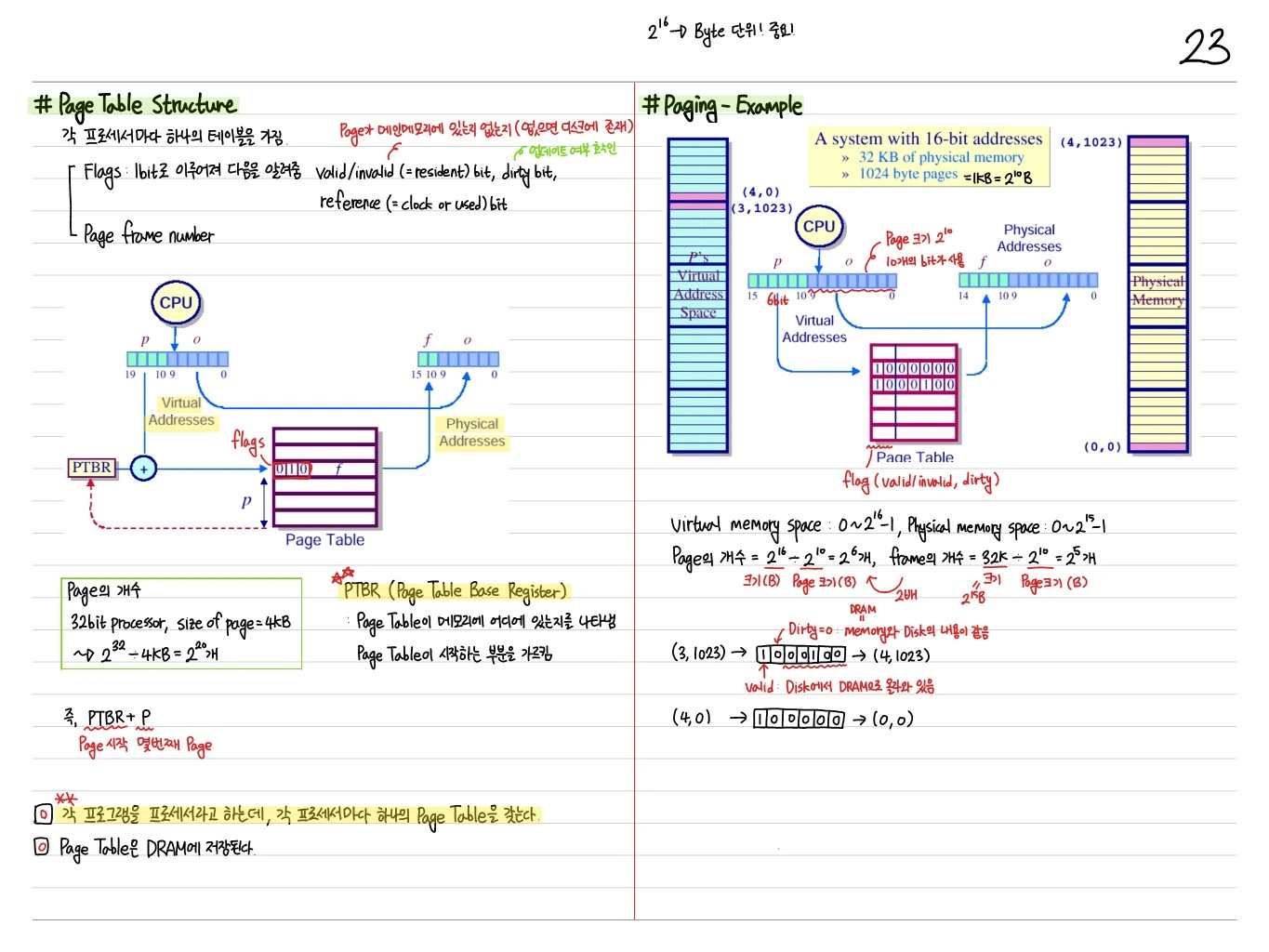
Each process has one table.
Flags (1 bit each, indicating the following):
- Valid/invalid (= resident) bit: whether the page is in main memory (if not, it is on disk)
- Dirty bit: whether it has been updated
- Reference (= clock or used) bit
Page frame number: the result of the translation
PTBR (Page Table Base Register)
- Indicates where the page table is in memory
- Points to where the page table starts
- PTBR + p → location of the corresponding PTE (page table entry)
Number of pages: 32-bit processor, size of page = 4KB → pages
Key points
- Each program (process) has its own page table
- Page tables are stored in DRAM
Demand Paging
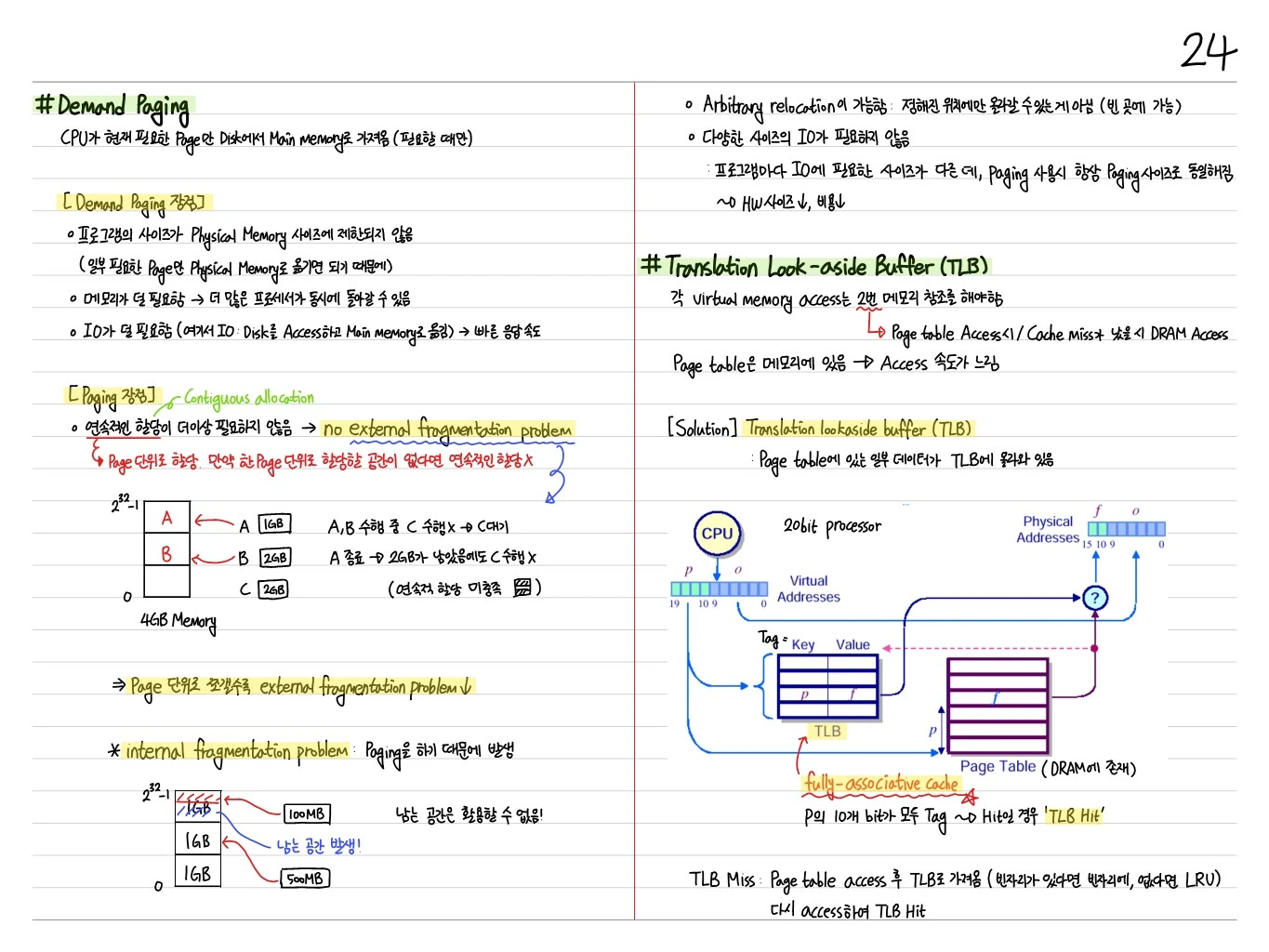
A page is loaded into main memory only when the CPU reads it (on demand).
Advantages
- Not every page has to be loaded into physical memory in advance → large programs can run
- Memory efficiency
Disadvantage: External Fragmentation
External fragmentation can occur when a contiguous region of pages is needed (although paging itself divides memory into fixed sizes, so there is almost no external fragmentation, but internal fragmentation does occur).
Translation Look-aside Buffer (TLB)
Every address translation would need a page table access (in DRAM) → cache access → DRAM access → far too slow.
Solution: the TLB (Translation Look-aside Buffer) = a cache for the page table.
- Fully-associative cache
- Caches recent page translations → in most cases a TLB hit skips the DRAM page table access
- TLB hit: the physical address is computed immediately, with no page table access
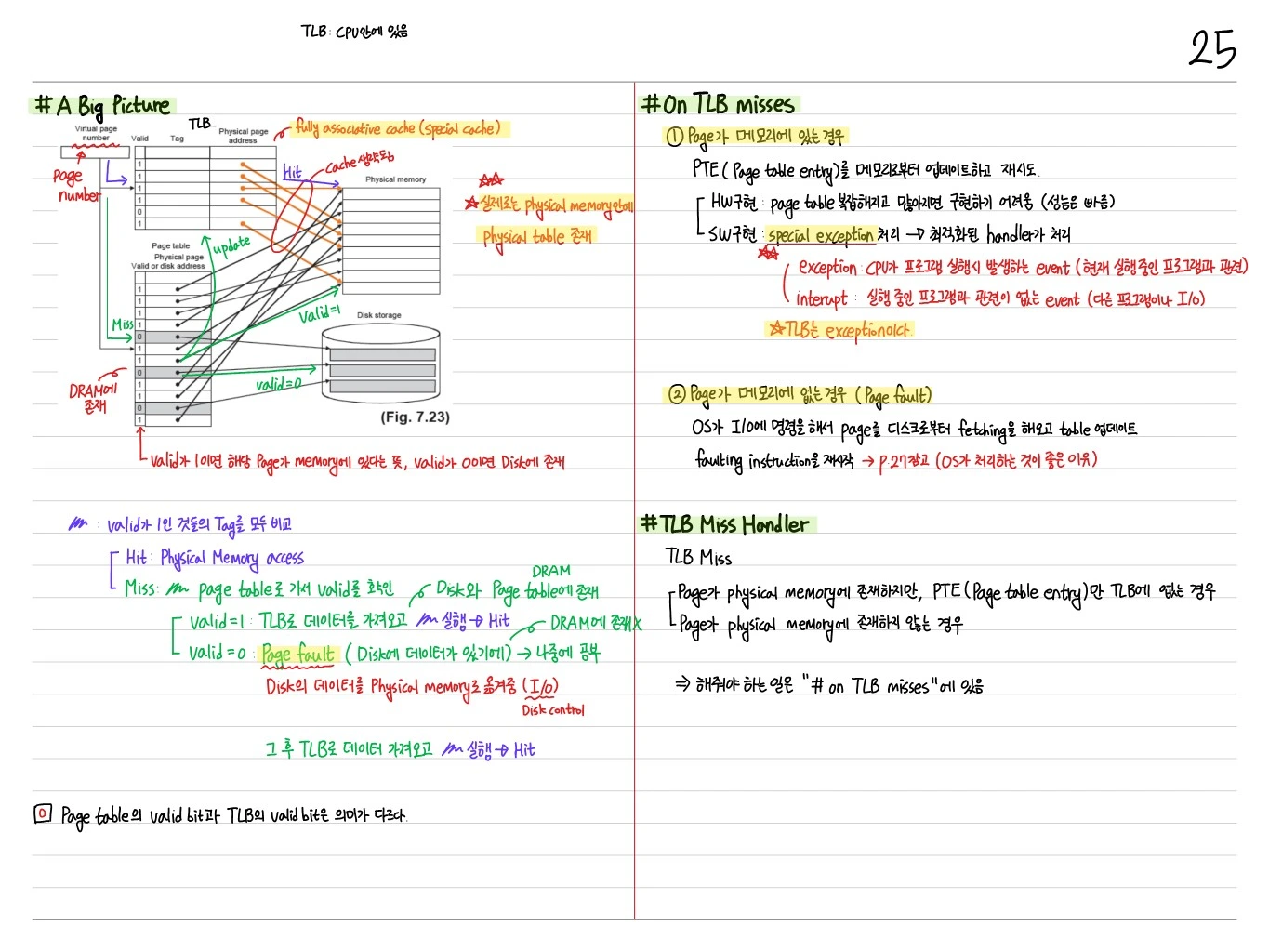
A Big Picture (TLB + Cache + Memory)
The full flow of virtual → physical translation + data access:
- The CPU generates a VA
- TLB access → TLB hit/miss
- TLB miss → page table access → PT hit/miss
- PT miss → page fault → fetch the page with disk I/O
- Cache access with the physical address
- Cache miss → main memory access
On TLB Miss
- The TLB accesses DRAM to find the page table entry (PTE)
- PTE valid bit=1 → update the TLB, translation succeeds
- PTE valid bit=0 → page fault → handled by the OS (page fault handler)
TLB Miss Handler
Fetches the page table entry from memory and updates the TLB.
Page Fault Handler
- ① Find the corresponding page on disk
- ② Choose the page in main memory to replace (using LRU)
- If its dirty bit is 1, first write the data in main memory back to disk
- ③ Move the page into main memory and update the page table (set the PTE's valid bit to 1)
- ④ Restart the process
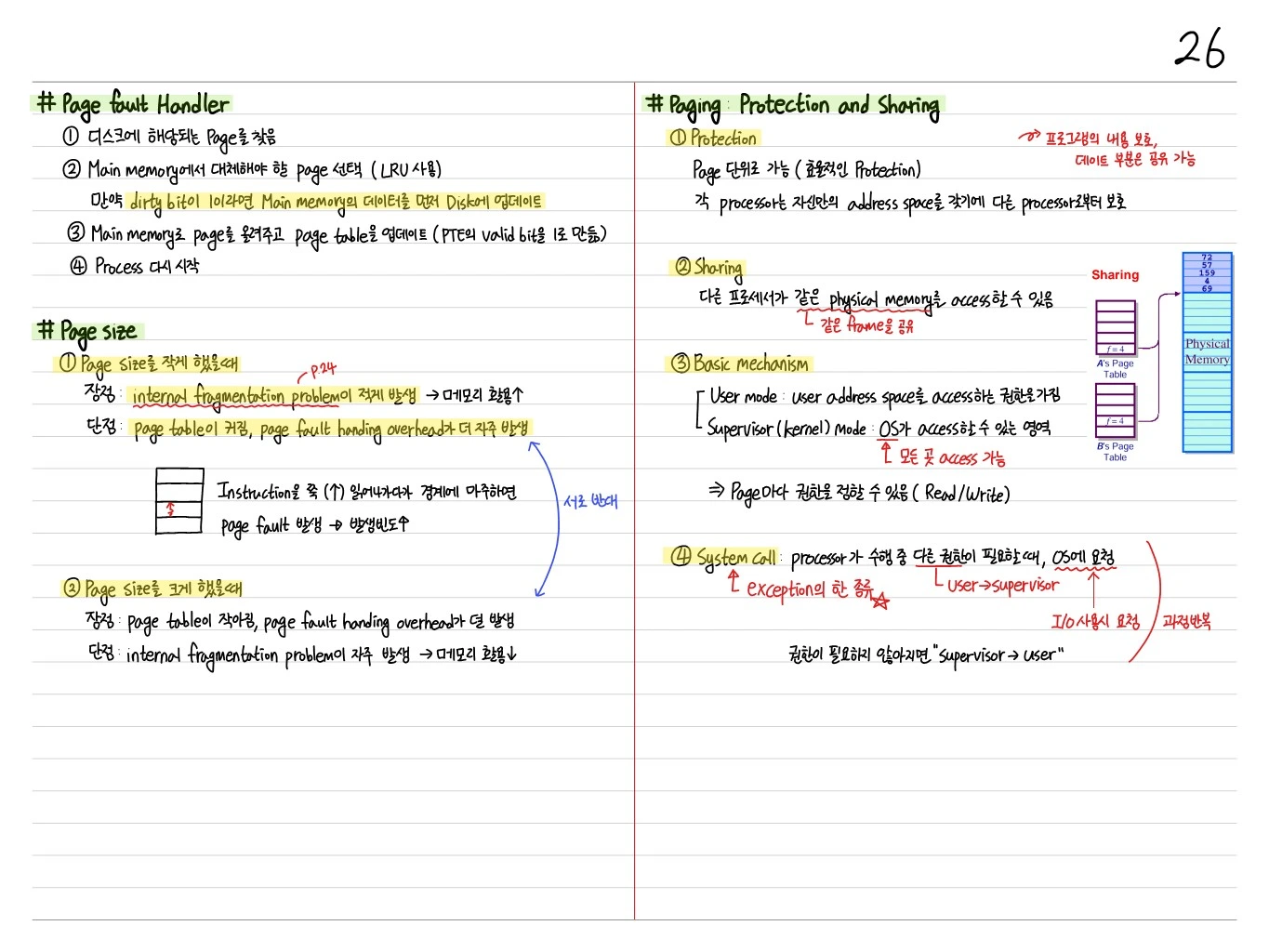
Choosing the Page Size
① With a small page size
- Pro: less internal fragmentation → better memory efficiency
- Con: the page table grows, and page fault handling overhead occurs more often
② With a large page size
- Pro: the page table shrinks, and page fault handling overhead occurs less often
- Con: internal fragmentation occurs more often → worse memory efficiency
When instructions are read sequentially and hit a page boundary, a page fault occurs → higher frequency
Paging — Protection and Sharing
① Protection
- Possible at page granularity (efficient protection)
- Each process has its own address space, so it is protected from other processes
② Sharing
- Different processes can access the same physical memory (sharing the same frame)
③ Basic Mechanism
- User mode: has permission to access the user address space
- Supervisor (kernel) mode: the region the OS can access (can access everything)
- Permissions can be set per page (read/write)
④ System Call
- When a running process needs different privileges, it asks the OS (a kind of exception)
- User → Supervisor (requested when using I/O)
- When the privilege is no longer needed, Supervisor → User (the cycle repeats)
Virtual Memory Performance
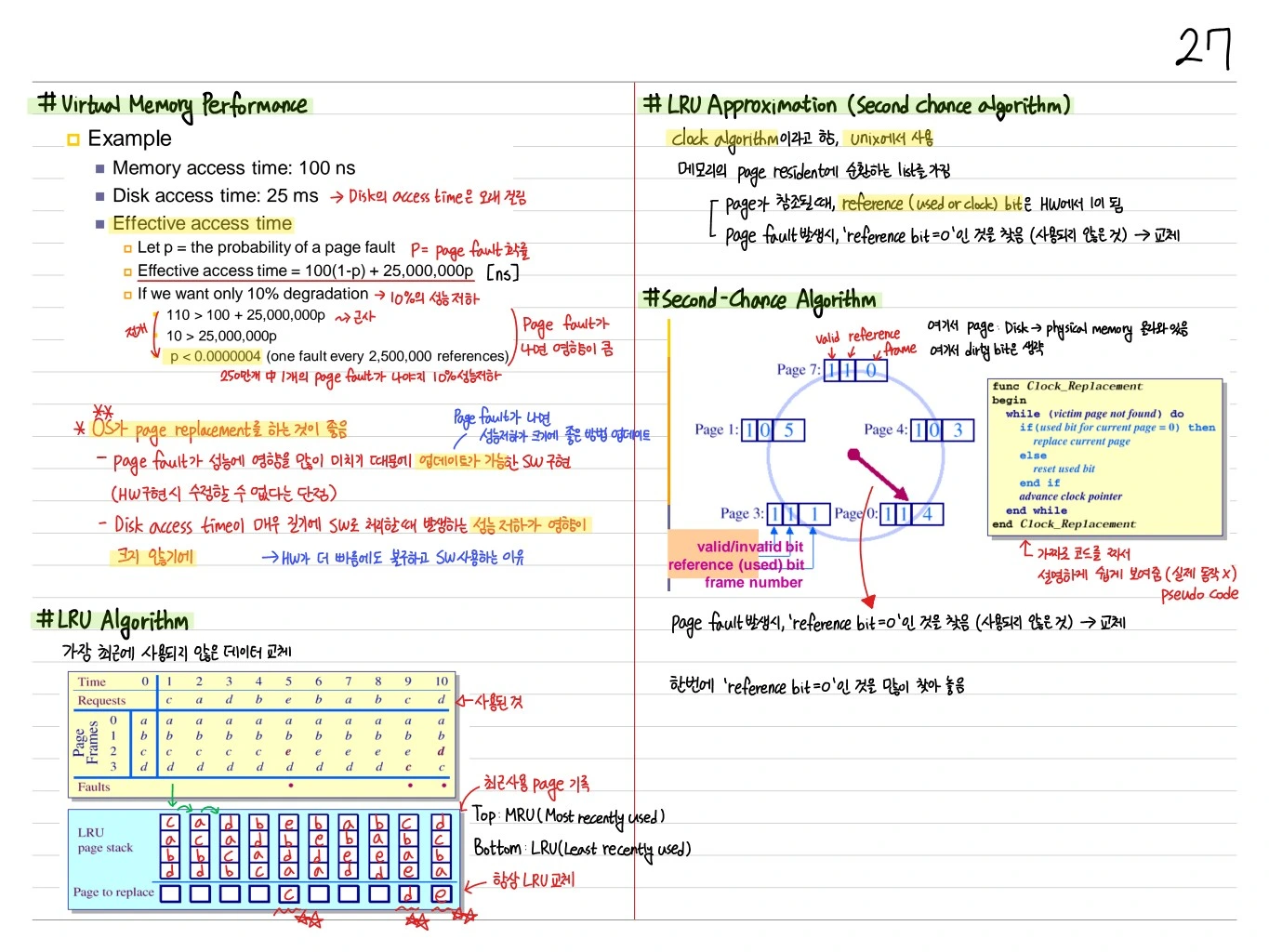
Example
- Memory access time: 100 ns
- Disk access time: 25 ms (= 25,000,000 ns, page fault cost)
- Effective access time:
- If = probability of a page fault
- : normal access (100 ns)
- : page fault (100 + 25,000,000 ns)
- If we want only 10% degradation → must be extremely small (a tiny fault ratio)
LRU Approximation — Second Chance Algorithm
Clock (page replacement) + reference bit.
- Every page has a reference bit
- When a page is referenced, its reference bit is set to 1
- When a replacement is needed: the clock pointer sweeps around, evicting a page with reference bit = 0; a page with reference bit = 1 is reset to 0 and the pointer moves on
- Nearly the same effect as LRU, and simple to implement
I/O Interlock
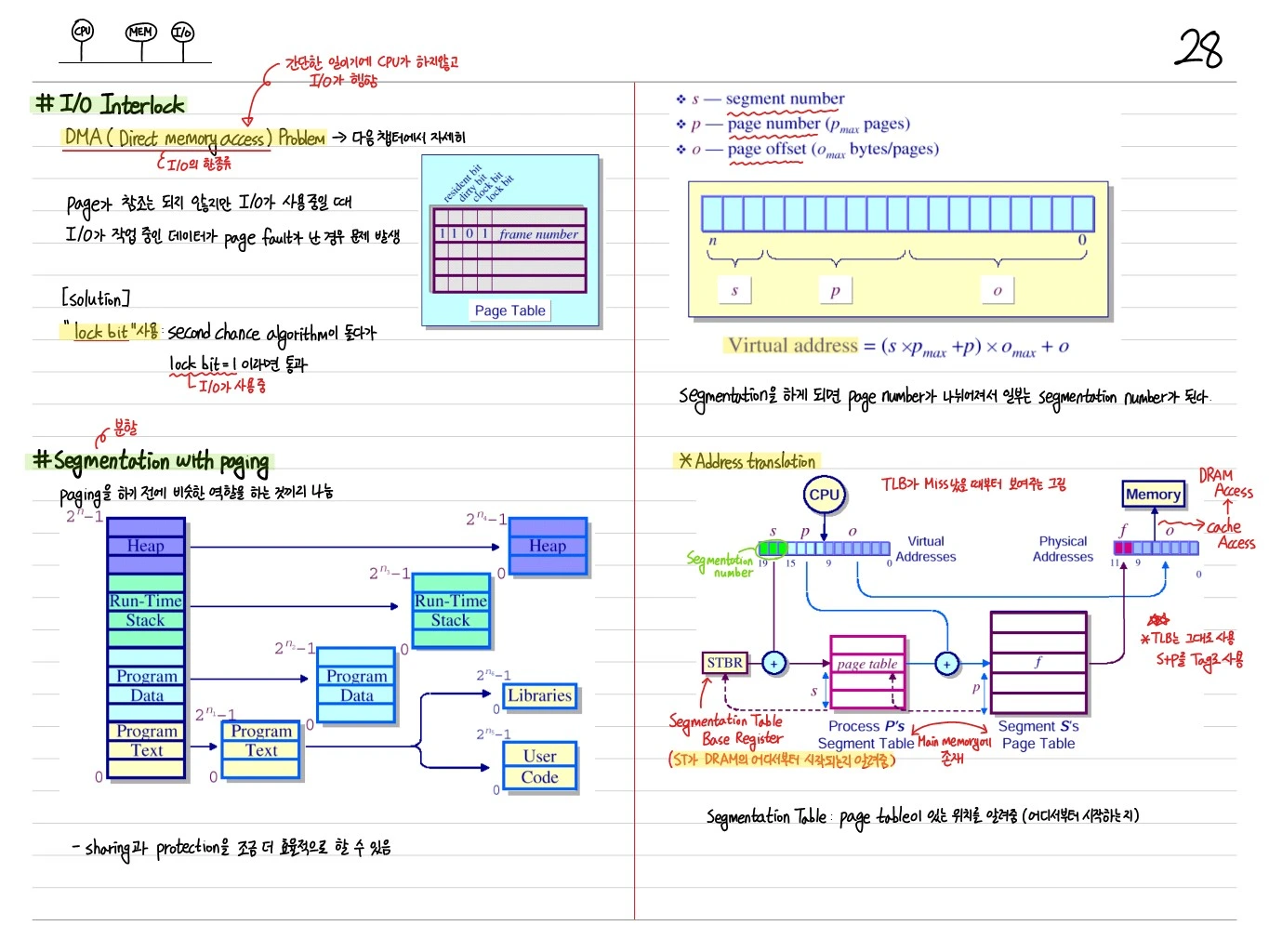
DMA (Direct Memory Access) problem: a page may not be referenced while I/O is still using it; if the data I/O is working on gets evicted and faults, there is a problem.
Solution: use a lock bit. When the second chance algorithm encounters lock bit = 1, it skips the page (I/O is using it).
Segmentation with Paging
Before paging, split memory into regions with similar roles → segmentation.
 Heap         →   Heap
 Run-Time Stack →  Run-Time Stack
 Program Data →   Program Data, Libraries
Program Text → Program Text, User Code- Sharing and protection become somewhat more efficient
- Virtual address =
- : segment number, : page number, : page offset
Address Translation with Segmentation
- STBR (Segment Table Base Register) — tells where in DRAM the segment table starts
- Segment table: tells where the page table is (where it starts)
- The TLB is used as before, with s+p as the tag
Advantages
Protection and sharing pay off more at segment granularity than at page granularity. Sharing is managed in units such as program text and shared segments.
Typical Memory Hierarchy (The Big Picture)
VA = [Virtual page number (20) | Page offset (12)]
        ↓
       TLB (Valid, Dirty, Tag, Physical page number)
        ↓ Hit
PA = [Physical page number | Page offset]
        ↓
  Cache (Valid, Tag, Data)
        ↓ Hit
  Data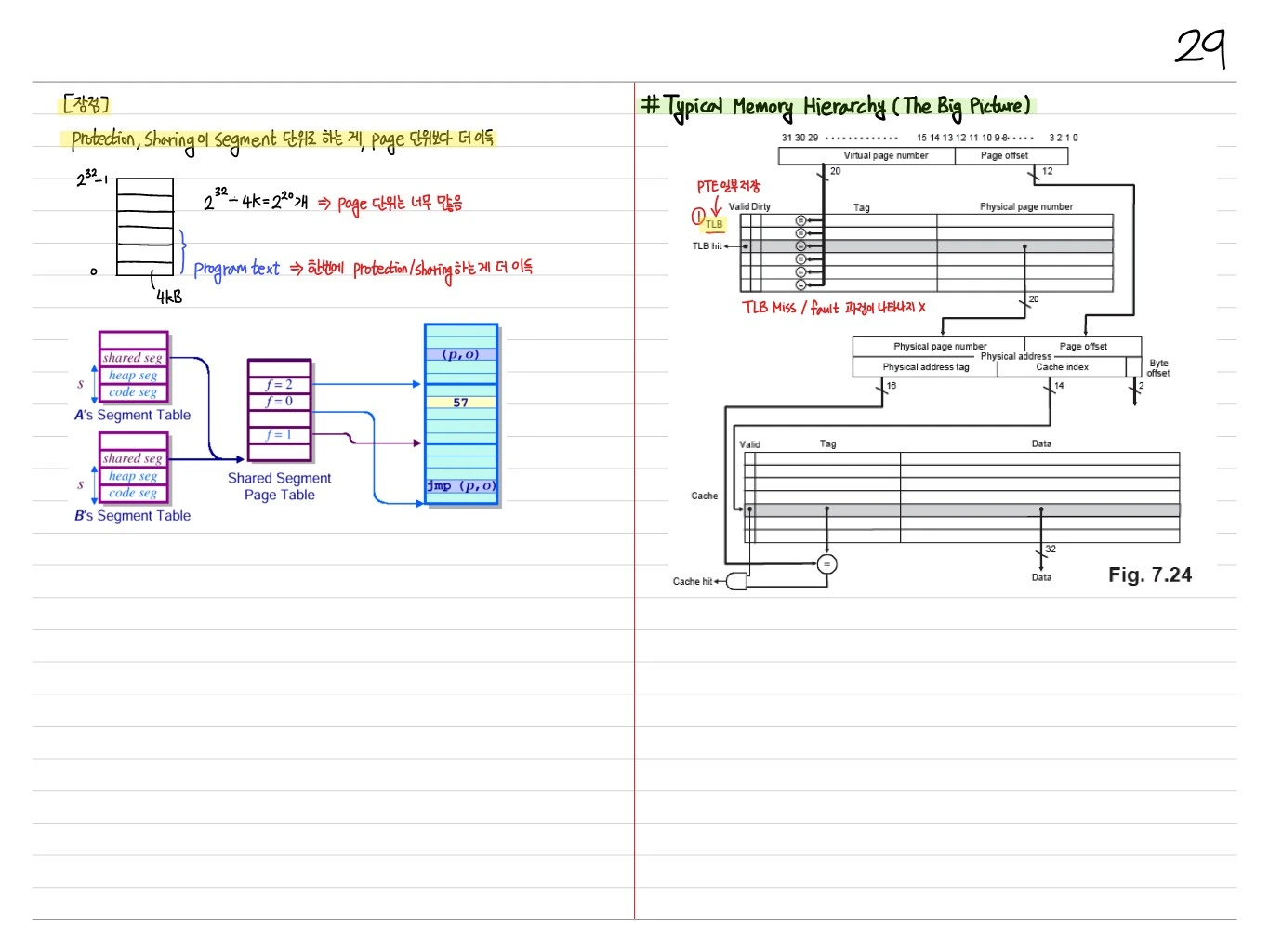
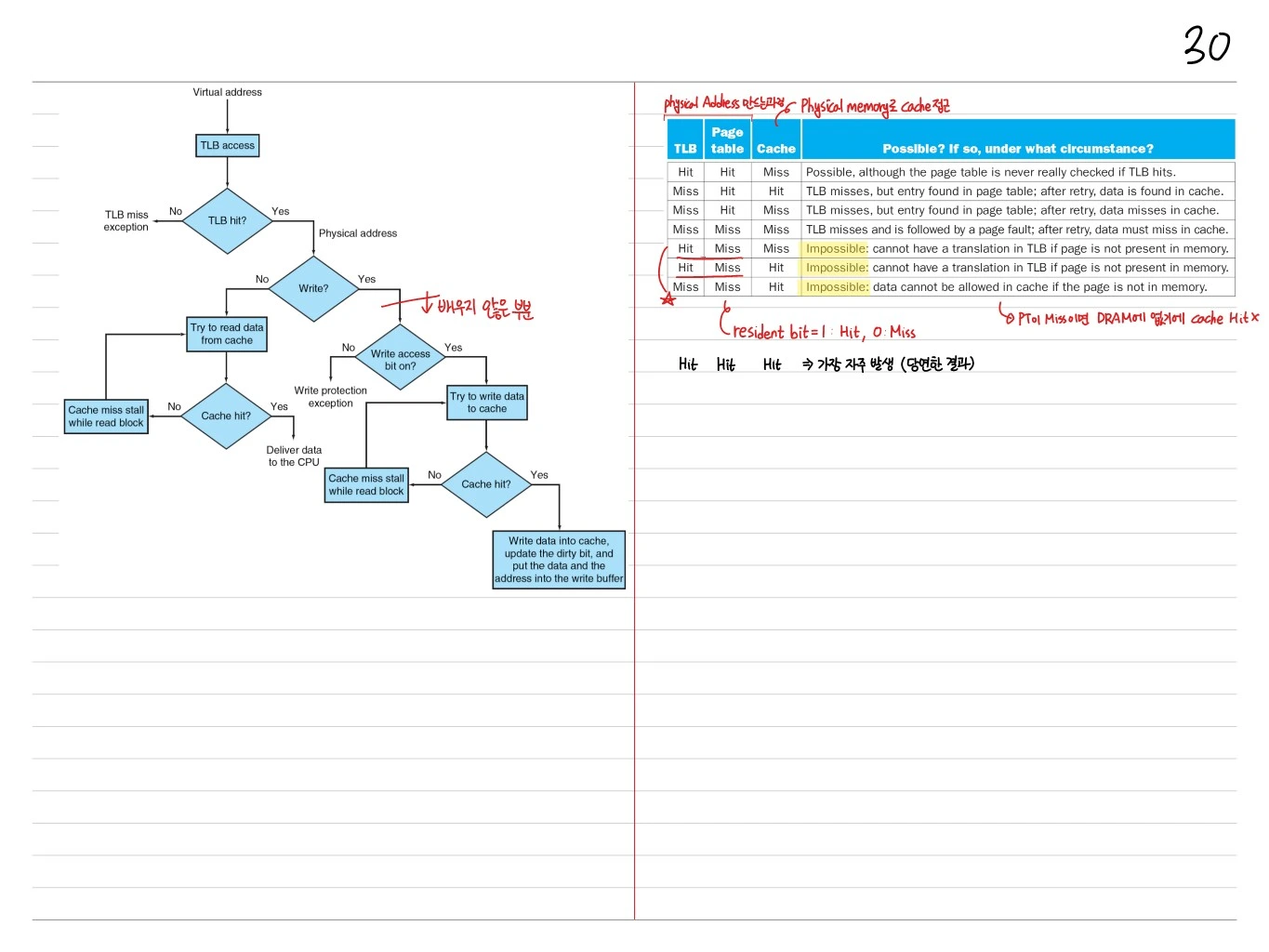
The Whole Flow — Flowchart
Virtual address → TLB access
  ├─ TLB hit?
  │   ├─ No → TLB miss exception
  │   └─ Yes → Physical address
  │             ↓ Write?
  │             ├─ No → Try to read from cache
  │             │        ├─ Cache hit → Deliver data to CPU
  │             │        └─ Cache miss stall, read block
  │             └─ Yes → Write access bit?
  │                      ├─ Off → Write protection exception
  │                      └─ On → Try to write to cache
  │                               ├─ Cache hit → Write + update dirty bit
  │                               └─ Cache miss stall, read block
Possible TLB / Page Table / Cache Combinations
| TLB | Page table | Cache | Possible? |
|---|---|---|---|
| Hit | Hit | Miss | Possible (with a TLB hit, the PT is not checked) |
| Miss | Hit | Hit | TLB miss, in the PT, in the cache |
| Miss | Hit | Miss | TLB miss, in the PT, cache miss |
| Miss | Miss | Miss | Page fault → cache miss after the retry |
| Hit | Miss | Miss | Impossible: it cannot be in the TLB but not in memory |
| Hit | Miss | Hit | Impossible |
| Miss | Miss | Hit | Impossible: it cannot be in the cache but not in memory |
| Hit | Hit | Hit | Most frequent (as expected) |
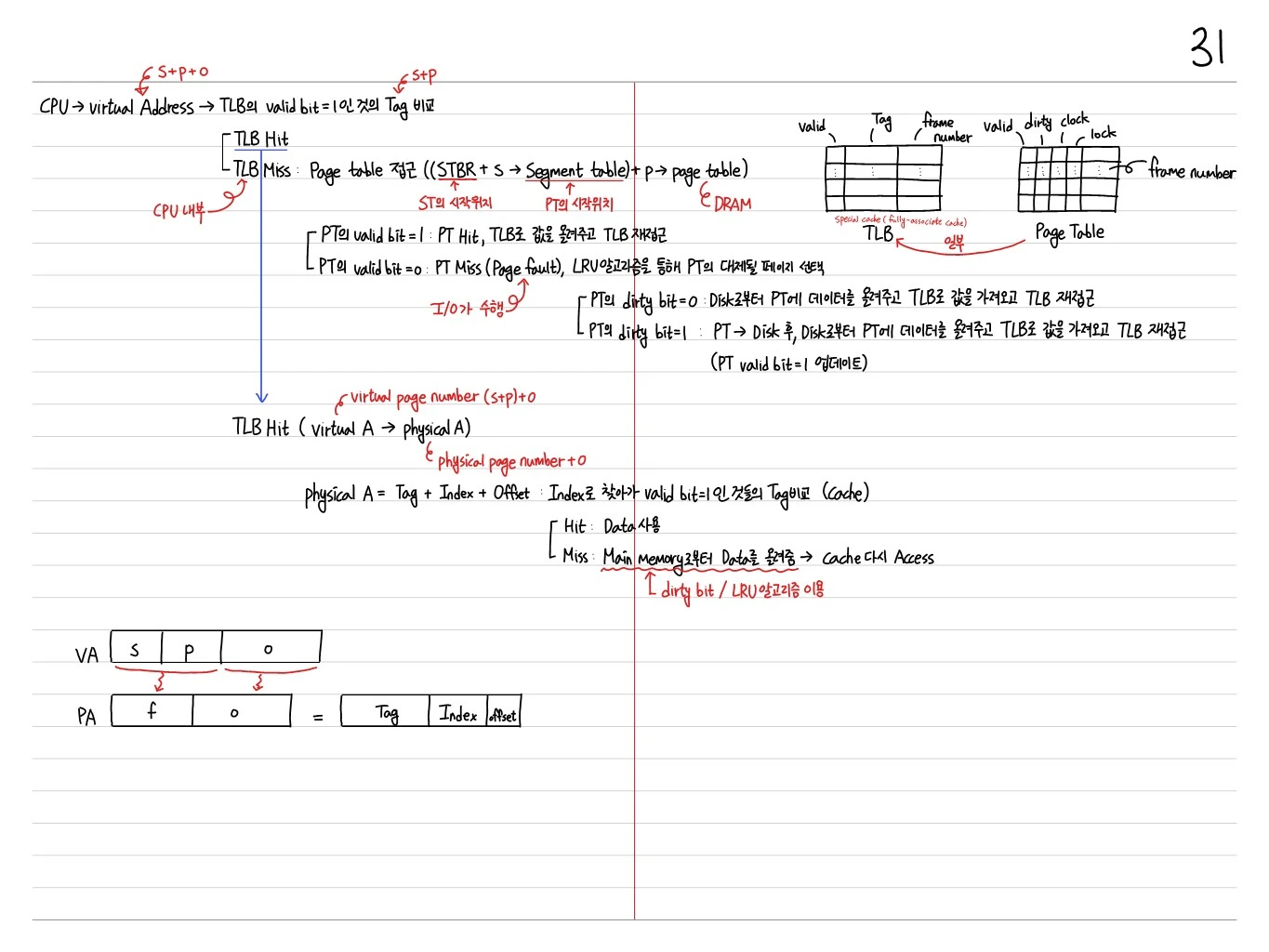
Full Summary — Steps of a Virtual → Physical Access
- CPU → virtual address
- Compare the tags of TLB entries with valid bit = 1
- TLB hit: physical page number + → cache access (tag + index + offset)
- TLB miss: page table access ((STBR + → segment table) + → page table)
- PT valid bit = 1 → PT hit: move the entry into the TLB and access the TLB again
- PT valid bit = 0 → PT miss (page fault): pick the page to replace using the LRU algorithm (perform I/O)
- Dirty bit = 0 → move the data from disk into memory, bring the entry into the TLB, and access the TLB again
- Dirty bit = 1 → write it back to disk first, then move the data from disk into memory, bring the entry into the TLB, and access the TLB again
Cache access: go to the set by index and compare the tags of entries with valid bit = 1
- Hit: use the data
- Miss: move the data from main memory → access the cache again (using the dirty bit / LRU algorithm)
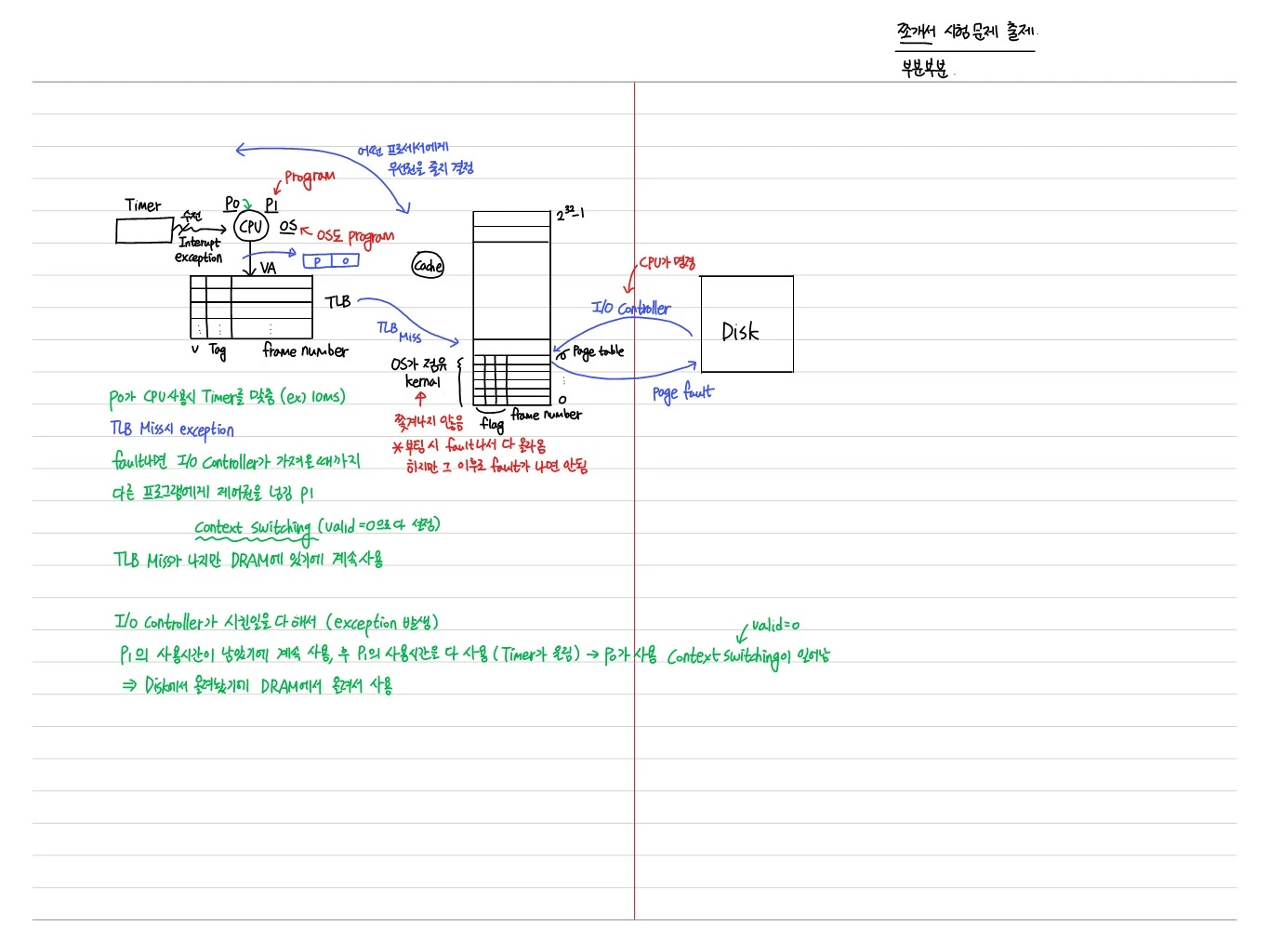
Scenario Example — Context Switching
- When P0 uses the CPU, a timer is set (e.g., 10 ms)
- On a TLB miss, an exception occurs
- On a fault, control passes to another program (P1) until the I/O controller fetches the page
- Context switch (all entries set to valid = 0): TLB misses occur, but the data is in DRAM, so P1 keeps running
- The I/O controller finishes its job (raising an exception)
- P1 keeps running while its remaining time runs down, then uses up its time slice (the timer fires) → a context switch back to P0 happens
- The page has been moved in from disk, so P0 now uses it from DRAM
Summary
- Virtual memory extends the physical memory illusion, enables multi-programming, provides protection/sharing
- Paging splits memory into fixed-size pages / frames
- Page table maps virtual pages to physical frames (stored in DRAM, indexed by PTBR)
- TLB caches page table entries to avoid DRAM access on every memory reference
- Page fault handler swaps pages between disk and memory (LRU with clock reference bit)
- Segmentation with paging gives coarse-grained sharing/protection on top of paging
- Overall memory access: TLB → Cache → Main Memory → Disk