1. Project Overview
About the Project
As a team project for the Human-Robot Interaction course at UNIST, we developed a "Guessing Game with Robot Arm" system. It is an interactive system in which the robot infers the target object from the user's hints, picks the object up, and hands it to the user.
The project integrates multimodal perception with precise motion control, tackling a core challenge of human-robot interaction: having the robot understand the user's intent and respond with physical action.
Project link: GitHub Repository
Team
Six people at UNIST worked on this project together:
- Eldor Fozilov (Department of Computer Science and Engineering)
- Gahyeon Shim (Graduate School of Artificial Intelligence)
- Minji Kim (Graduate School of Artificial Intelligence)
- Seongjae Lee (Department of Electrical Engineering)
- Sunhong An (Department of Electrical Engineering)
- Youngbin Ki (Graduate School of Artificial Intelligence)
Background
Robots are taking on an ever wider range of roles in daily life. Boston Dynamics' Spot performs inspections in hazardous areas, and LG's Smart Home AI Agent manages devices in the home. Robots like these handle specific task requirements, reducing people's workload and improving efficiency.
With advances in AI-based human-robot interaction algorithms, expectations are growing that robots will infer human intent and respond accordingly. This progress lets robots go beyond basic automation toward human-centered interaction.
Project Goals
The "Guessing Game" developed in this project is a system in which the robot infers the user's intent from the user's hints, feedback, and environmental context. The robot performs three main actions:
- Inference: infer the target object from the user's input
- Validation: confirm the choice through user feedback
- Delivery: hand the object to the user
To do this, the system integrates a perception module that processes visual and textual cues with a control module that drives the robot's motion.
2. System Architecture
Overall Workflow
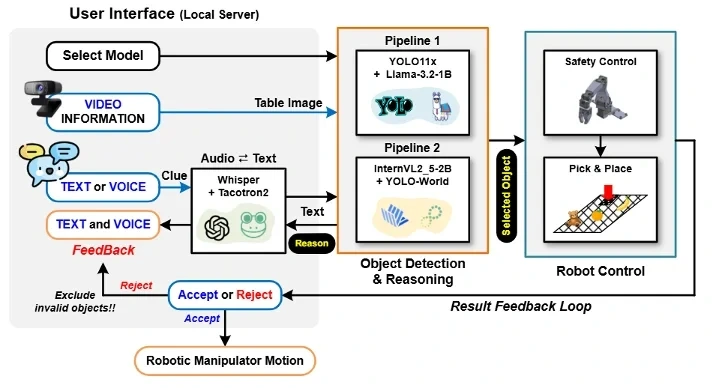
The overall workflow of the system is as follows:
- User input: the user places objects on the table and gives a hint about the target object
- Speech processing: for voice input, the Whisper model converts speech to text
- Perception module: processes a top-down image of the table and the user's hint to detect objects and run inference
- Robot control: moves the robot arm to the location of the inferred object and picks it up
- Feedback loop: shows the inference result to the user and receives feedback
- If correct: hand the object to the user
- If wrong: place the object in a designated area and explain the reasoning aloud with Tacotron2 TTS
Objects judged wrong are excluded from subsequent searches to avoid repeating the same mistake.
User Interface
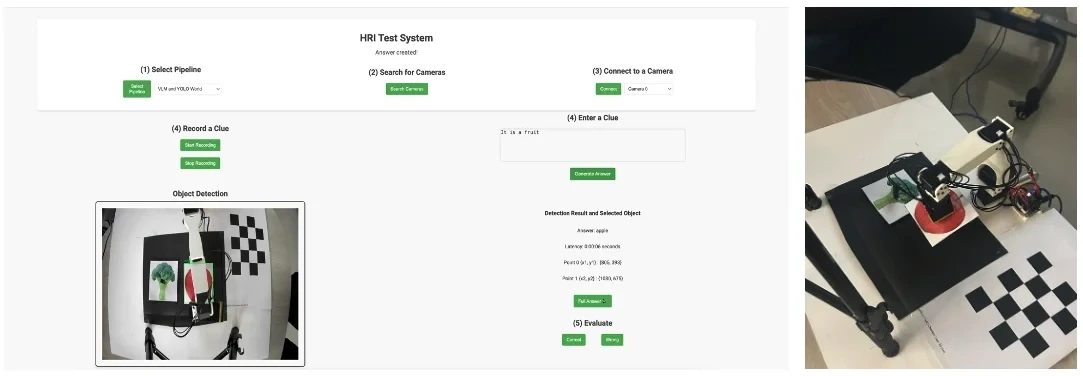
We implemented a web UI hosted on a local Flask server. User input is handled by Python functions triggered from JavaScript files. We named the system "HRI TEST System."
Main UI features:
- Pipeline selection: choose one of two perception pipelines
- Camera connection: connect the camera that captures the objects on the table
- Hint input: give a hint by text or voice
- Object detection results: show the detected objects and the selected object
- Feedback: rate the result with Accept/Reject buttons
3. Perception Module
The perception module handles object detection and inference. We implemented two pipelines to explore how well the system generalizes to both predefined and new objects.
Pipeline 1: Closed-Vocabulary Approach
Components
- YOLO11: an efficient object detection framework that uses a predefined set of classes
- LLaMA-3.2-1B: a language model with strong reasoning ability
How It Works
- Object detection: YOLO11 processes the captured image and returns bounding box coordinates and labels for objects belonging to the predefined classes
- Filtering: objects the user previously rejected are filtered out
- Inference: the filtered object labels and the user's hint are passed to LLaMA, which selects the best-matching object
Prompt Design
We used the following prompt to guide the LLaMA model's output:
You are an assistant whose task is to identify the correct object from this list
{detected objects} that aligns best with the following clue: '{clue}'.
Take a moment to think about each object's properties, considering how the
clue relates to them, directly or indirectly.
Provide your response in the following format:
Selected Object: <name of the correct object>
Explanation: <brief explanation of how the object's properties align with the clue>
The output of this pipeline is the inferred object name and an explanation, which are passed on to the next stage of the system.
Pipeline 2: Open-Vocabulary Approach
Components
- InternVL-2.5-2B: a vision-language model that excels at multimodal reasoning tasks
- YOLO-World: an efficient open-vocabulary object detection framework
How It Works
- Multimodal reasoning: the captured image and the user's hint are fed into InternVL-2.5-2B
- Object identification and selection: the model detects and classifies every object in the image and selects the one that best matches the hint
- Location extraction: the selected object name and the image are passed to YOLO-World to get the bounding box coordinates
Prompt Design
You are an assistant whose task is to analyze the given image and the following
clue: '{clue}'.
1. Identify and list all the objects present in the image.
2. From the list of identified objects, select the one that best aligns with the
clue, while ignoring these excluded objects if present: {excluded objects}.
3. Provide a brief explanation of why the selected object matches the clue.
Format your response as follows:
All Identified Objects: <comma-separated list of objects>
Selected Object: <name of the correct object>
Explanation: <brief explanation>
Comparing the Two Pipelines
| Property | Pipeline 1 | Pipeline 2 |
|---|---|---|
| Object detection | YOLO11 (Closed) | YOLO-World (Open) |
| Reasoning model | LLaMA-3.2-1B (Text) | InternVL-2.5-2B (Vision+Text) |
| Handles new objects | No | Yes |
| Processing speed | Fast | Relatively slow |
Pipeline 1 detects predefined classes quickly and accurately but cannot handle new objects. Pipeline 2 uses an open-vocabulary approach and can handle new objects too, but the vision-language model's inference takes longer.
4. Control Module
Coordinate Transformation
In the guessing game, the robot operates in a coordinate frame whose origin is the center of the robot base. The object positions from the perception module, however, are defined in a 2D image coordinate frame. So the 2D coordinates must be transformed into 3D coordinates in the robot frame.
Camera Calibration
The intrinsic matrix is fixed when the camera is manufactured and is computed once using a ChArUco board.
The extrinsic matrix represents the transform between the camera and world frames and must be recomputed whenever the camera moves. At the start of each game, the camera captures the current view and the OpenCV library detects the checkerboard pattern to compute .
Coordinate Transformation Equation
Since the position and orientation of the calibration board relative to the robot origin is known, a 2D image point can be transformed into a 3D world point in the robot frame:
An RGB camera cannot provide depth, so we take advantage of the fact that images are always captured top-down and use a fixed height from the camera to the workspace.
Robot Control
Inverse Kinematics
To move the robot's end effector to the target position, we apply an inverse kinematics (IK) solver to compute the joint values of the 6-DoF robot arm. We used the IKPy library, a lightweight and fast open-source solution.
The trajectory is generated by linearly interpolating between the current and target positions and dividing it into evenly spaced steps. This trajectory is used to control the positions of the Dynamixel motors.
PID Control
To reach the target position accurately, we applied PID (proportional-integral-derivative) control. The error is defined as the difference between the target PWM value and the current PWM value of each joint.
where:
- : position error at time t
- : control signal output that adjusts the motor position
- , ,
Once the position error drops below a defined threshold, the robot completes the current motion and moves on to the next.
Collision Avoidance
To keep the robot from colliding with other objects or unintended areas, we fixed the end effector's orientation pointing downward during gripping. This avoids collisions with nearby objects and ensures stable, accurate pick-and-place motion.
5. Experimental Design and Setup
Experimental Assumptions
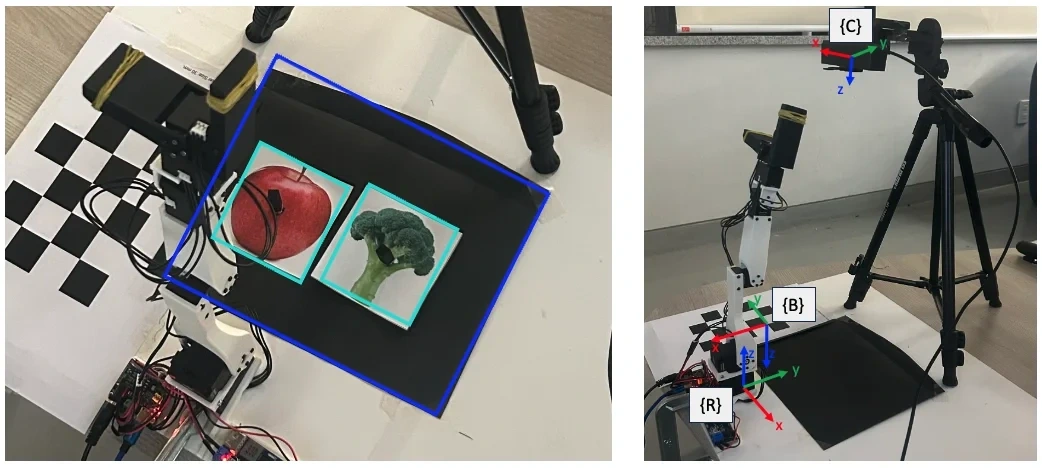
Object Design
The provided gripper was not suited to handling real objects, so we used 2D printed images. The images were printed large enough for the perception module to detect, and 3D-printed posts were attached so the robot could grab them.
Object Placement
All objects are placed within a predefined workspace (blue box) that accounts for the robot arm's reach and the camera's field of view.
Coordinate Frames
Three coordinate frames are defined in the experimental setup:
- {R}: robot base frame (origin)
- {B}: checkerboard frame (for calibration)
- {C}: camera frame
Experimental Setup
- Camera: FHD webcam
- Robot: Koch v1.1 with position control (a low-cost robot arm)
- Gripper modification: the original gripper's pointed design caused unstable gripping, so we modified it to increase the contact area for more stable gripping. We also wrapped rubber bands around the gripper tips to increase friction and improve grip stability
Experimental Scenarios
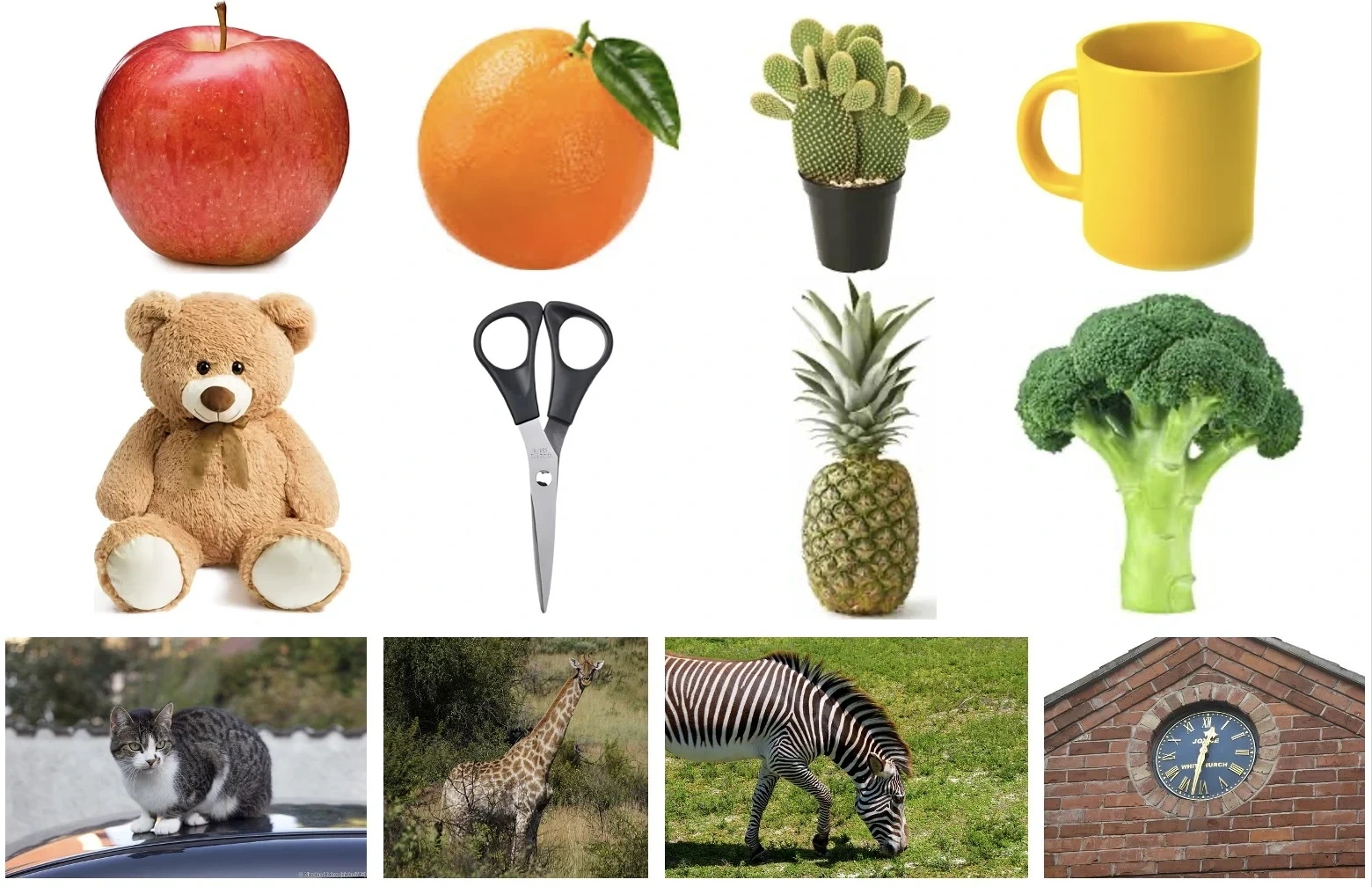
We designed a total of 20 experimental scenarios. They cover 12 predefined object classes, including both classes used in YOLO training and classes that were not.
Each scenario consists of a set of 3 objects. To evaluate system performance, we used GPT-4o to generate hints at two difficulty levels for each scenario.
Object classes (12):
- YOLO classes: apple, orange, cup, scissors, teddy bear, broccoli, pineapple, clock
- Non-YOLO classes: cactus, cat, giraffe, zebra
6. Experimental Results
Perception Module Evaluation
Metrics
Classification accuracy:
- YOLO: success requires every object in the image to be classified correctly
- YOLO-World: success requires the object's class label to match the class provided by the vision-language model
Inference accuracy:
- : success rate with a single hard hint
- : success rate with an easy hint after the first hint failed
Results
| Pipeline | Detection accuracy | ||
|---|---|---|---|
| YOLO + LLM (Pipeline 1) | 80.0% | 75.0% | 20.0% |
| VLM + YOLO-World (Pipeline 2) | 100.0% | 75.0% | 100.0% |
Classification results:
- Pipeline 1 reached 80% accuracy, while Pipeline 2 classified the objects successfully in every test
- YOLO struggles with objects outside its predefined class set, but YOLO-World classified those objects successfully as well
- This indicates that YOLO-World has broader classification ability and can handle a wider variety of objects
Inference results:
- Both pipelines reached 75% on
- On , Pipeline 1 reached 20% and Pipeline 2 reached 100%
- This large gap is because YOLO-World can detect new objects that are not in the predefined class set
- Pipeline 1 fails whenever the target object does not belong to the predefined class set
Robot Motion Control Evaluation
Metrics
Task success rate: the average rate of successful task completion over n test runs. A run counts as a success if the robot picks up the target object and places it at the designated location.
Position error: the average Euclidean distance between the target point and the point the robot actually moved to.
Integrated System Test
We tested the full system with perception and control integrated. For each pipeline, we placed 3 objects in the workspace and followed the scenarios used in the perception module evaluation. A run counts as a success if the robot infers the correct object out of the 3 from the hint and performs the pick-and-place motion. We ran a total of n=20 runs for each pipeline.
Results
| Method | Success rate | Position error |
|---|---|---|
| Pipeline 1 + Control | 75.0% | - |
| Pipeline 2 + Control | 75.0% | - |
| Control only | 86.7% | 0.016mm |
Integrated system results:
- Both Pipeline 1 and Pipeline 2 reached a 75% task success rate, succeeding in 16 of 20 runs
- Each run finished within 1 minute, demonstrating the system's ability to operate in real time
- When Pipeline 2 was integrated with the control system, most failures came from robot malfunctions that developed as the experiments went on
- Even though Pipeline 2 showed excellent inference on new objects, motor malfunctions sometimes kept the robot from reaching the target point or left it in an unwanted pose
Control Module Standalone Test
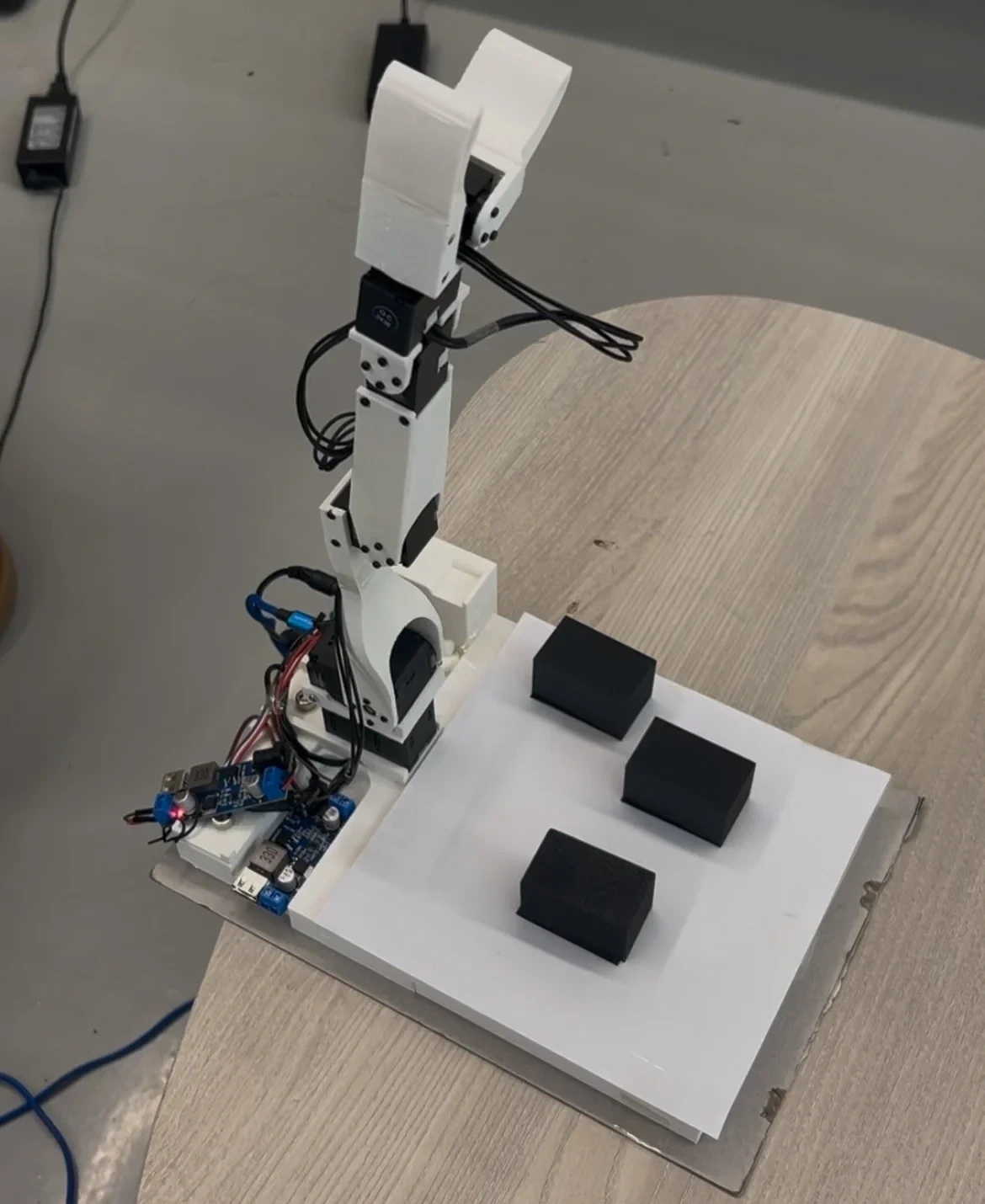
To further evaluate the control module, we ran additional experiments using another group's robot. We placed 3 objects in the workspace, and a run counts as a success if the robot picks up the target object and places it at the designated location. We ran a total of n=60 runs.
Control module results:
- The average position error was within 2 cm in every experiment, showing that the control method using PID control and the IK solver from the IKPy library is accurate
- In terms of task completion, the robot successfully picked up the target object in every run
- However, there were some cases where it failed to place the object at the designated location
7. Conclusion and Future Work
Project Outcomes
In this project, we developed a human-robot interaction system that effectively combines multimodal perception and control for intuitive interaction. The experimental results show robust performance in object recognition, inference, and manipulation, highlighting its applicability to real-world tasks.
Key outcomes:
- Implemented and comparatively analyzed two perception pipelines
- Confirmed the superior generalization of the open-vocabulary approach (Pipeline 2) to new objects
- Implemented precise robot motion control through coordinate transformation and PID control
- Built an integrated system that runs in real time (each run under 1 minute)
Significance of the System
The system's ability to interpret user hints and respond to user feedback shows potential in applications such as:
- Personalized assistance: providing tailored services by understanding user intent
- Smart homes: manipulating household items through voice or text commands
- Collaborative workspaces: intuitive collaboration between workers and robots
Future Work
Future work could extend the system's capabilities in the following directions:
- More complex environments: testing in more diverse and complex real-world settings
- Mobile robot integration: moving from a fixed robot arm to a mobile robot
- Real objects: manipulating real 3D objects instead of 2D printed images
- Multi-turn dialogue: improving inference through more complex hints and conversation
- Learning-based control: moving from PID control to reinforcement learning-based control
References
- Whisper - OpenAI's Automatic Speech Recognition System
- Coqui TTS - Deep learning toolkit for Text-to-Speech
- YOLO11 - Object Detection Framework
- LLaMA 3.2-1B - Multilingual Large Language Model
- InternVL2.5-2B - Multimodal Large Language Model
- YOLO-World - Real-Time Open-Vocabulary Object Detection
- IKPy - Inverse Kinematics Library